MetaTrader 5 Backtest Manager – Your MT5 Trading Journal
Manage all your MetaTrader 5 backtests inside one structured dashboard. The AUTOSTRAT Backtest Manager works as a professional MT5 trading journal where you can track AutoStrat Scores, monitor key KPIs, organize strategies into custom areas, and launch direct backtest comparisons.
This page builds on the individual MT5 Backtest Analysis engine, where each MT5 Strategy Tester report is analyzed and scored before being stored in your portfolio. From here, you can also launch direct Backtest Comparisons to evaluate multiple strategies side-by-side.
Clear. Comparable. Organized.
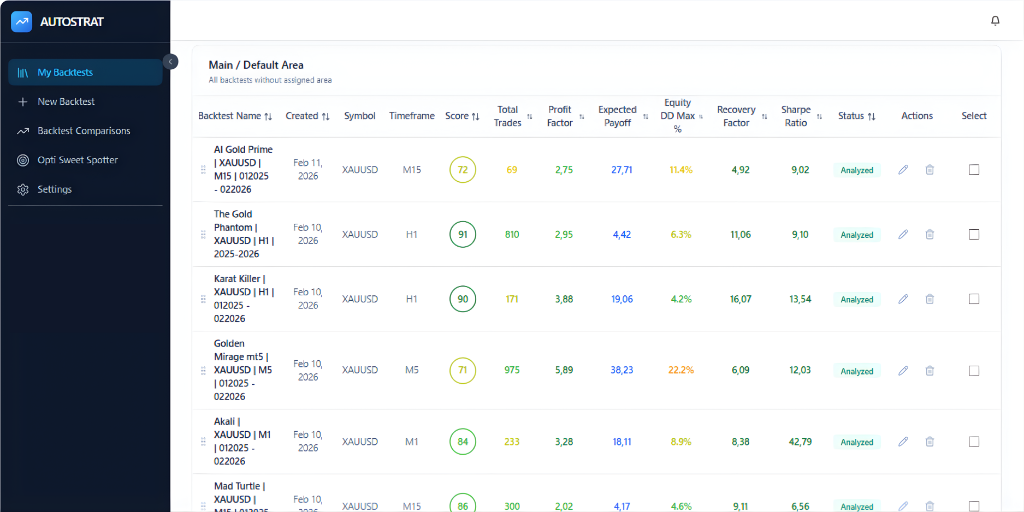
All MT5 Backtests in One Structured Dashboard
Every analyzed MetaTrader 5 backtest appears here in a sortable performance table.
You instantly see:
- Expert Advisor name
- Symbol
- Timeframe
- Creation date
- AutoStrat Score (main comparison metric)
- Total Trades
- Profit Factor
- Expected Payoff
- Maximum Equity Drawdown
- Recovery Factor
- Sharpe Ratio
- Status
This allows immediate structural comparison across all strategies.
The AutoStrat Score serves as the standardized benchmark for quick ranking.
Organize Strategies by Areas and Groups
The Backtest Manager allows you to create Areas to structure your trading research.
Examples:
- Live Systems
- Demo Testing
- Different EA types
- Swing Strategies
- Gold Strategies
- Optimization Candidates
- EAs Under Review
This makes AUTOSTRAT function like a structured Trading Journal instead of a simple file list.
Large research libraries stay clean and navigable.
Sort, Rank and Filter Strategies Instantly
Each column in the dashboard can be sorted.
You can rank strategies by:
- AutoStrat Score
- Profit Factor
- Sharpe Ratio
- Drawdown
- Trade Count
- Creation Date
This makes it easy to identify:
- Top-performing systems
- High-risk strategies
- Under-tested EAs
- Recently added candidates
No spreadsheets required.
Full Strategy Control from One Interface
Directly from the Backtest Manager you can:
- Open detailed analysis
- Edit strategy notes
- Move strategies between Areas
- Delete backtests
- Restore deleted backtests
- Select multiple strategies
- Start Backtest Comparison
This eliminates workflow friction.
The Backtest Manager is not just an overview – it is your operational research environment.
Built on Structured Backtest Analysis
Every strategy listed here is based on a full AI-powered MT5 backtest analysis.
The My Backtests page transforms MetaTrader 5 results into a structured, comparable research archive.
Instead of isolated backtest files, you build a measurable and organized trading journal.
Consistent scoring.
Structured documentation.
Clear strategy ranking.